 Coucou
 on iPhone
What you need
- Mac: Coucou 0.1.9 or later on macOS 15+ (download, or the Mac App Store version once it’s out).
- iPhone: iOS 18 or later.
- iCloud: the same Apple Account on the Mac and the iPhone. That’s the whole link: no account to create, no pairing code.
Get it on your iPhone
- Install Coucou on your iPhone: install TestFlight from the App Store, then Join the TestFlight beta. The beta is free; Apple limits it to 10,000 testers. App Store version coming soon.
- On your Mac: Coucou icon in the menu bar → Settings… → General → iPhone, turn on Show my agent sessions on my iPhone, and Move Mochi to my iPhone’s Dynamic Island when my Mac is locked for the Lock Screen.
- On the iPhone: open Coucou and allow notifications.
- Start a Claude Code session on the Mac: it shows up on the iPhone within seconds.
What you can do
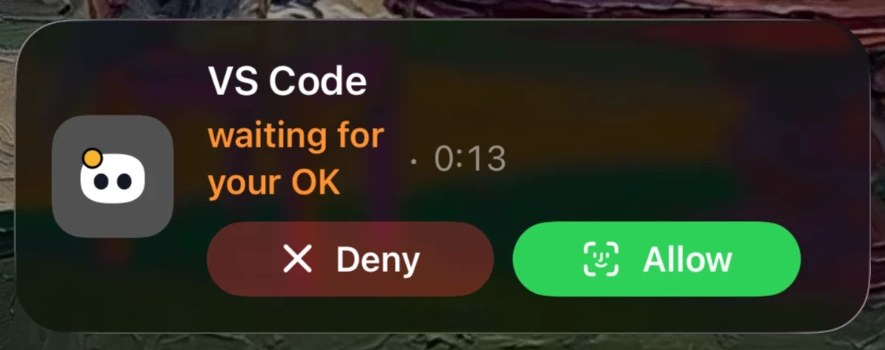
- Allow or Deny a permission from the notification, the Lock Screen or the app. Allow asks for Face ID, and your Mac only applies a decision meant for the exact command it is waiting on.
- Answer Claude’s questions with one tap.
- Follow every session live: the prompt, the commands, the diffs and Claude’s answer.
- Send the next instruction by text or voice (GitHub build of the Mac app).
- Mochi on the Lock Screen and in the Dynamic Island while your Mac is locked.
- Your services up close (GitHub, Vercel, Stripe, Cal.com, n8n, Notion, Resend), with safe actions behind Face ID: re-run CI, merge a pull request, redeploy, pause a workflow. Nothing that moves money or sends an email.
- Widgets, Control Center, Siri and Shortcuts, Spotlight and a Focus filter.
Troubleshooting
Nothing shows up
Check that the Mac and the iPhone use the same Apple Account in iCloud, that Show my agent sessions on my iPhone is on in the Mac app (0.1.9 or later), then pull down on the Agents tab to refresh.
No notifications
iPhone Settings → Notifications → Coucou: allow them. A Focus mode or Coucou’s quiet hours can hide them.
Mochi doesn’t come to the Lock Screen
Turn on the Dynamic Island switch on the Mac, and iPhone Settings → Coucou → Live Activities. Open Coucou on the iPhone once after installing it. iOS limits how often an app can start a Live Activity: after many lock cycles in a row it may skip a few, then it comes back on its own.
The full guide, with how to build the iPhone app yourself, is on GitHub. Still stuck? Support.
Coucou sur iPhone
Ce qu’il te faut
- Mac : Coucou 0.1.9 ou plus récent sur macOS 15+ (télécharger, ou la version Mac App Store dès qu’elle sort).
- iPhone : iOS 18 ou plus récent.
- iCloud : le même compte Apple sur le Mac et l’iPhone. C’est tout le lien : pas de compte à créer, pas de code d’appairage.
L’installer sur ton iPhone
- Installe Coucou sur ton iPhone : installe TestFlight depuis l’App Store, puis rejoins la bêta TestFlight. La bêta est gratuite ; Apple la limite à 10 000 testeurs. Version App Store à venir.
- Sur ton Mac : icône Coucou dans la barre des menus → Settings… → General → iPhone, active Show my agent sessions on my iPhone, et Move Mochi to my iPhone’s Dynamic Island when my Mac is locked pour l’écran verrouillé.
- Sur l’iPhone : ouvre Coucou et autorise les notifications.
- Lance une session Claude Code sur le Mac : elle apparaît sur l’iPhone en quelques secondes.
Ce que tu peux faire
- Autoriser ou refuser une permission depuis la notification, l’écran verrouillé ou l’app. Autoriser demande Face ID, et ton Mac n’applique une décision qu’à la commande exacte qu’il attend.
- Répondre aux questions de Claude en un geste.
- Suivre chaque session en direct : la demande, les commandes, les diffs et la réponse de Claude.
- Envoyer l’instruction suivante au clavier ou à la voix (version GitHub de l’app Mac).
- Mochi sur l’écran verrouillé et dans la Dynamic Island pendant que ton Mac est verrouillé.
- Tes services en détail (GitHub, Vercel, Stripe, Cal.com, n8n, Notion, Resend), avec des actions sûres derrière Face ID : relancer la CI, merger une pull request, redéployer, mettre un workflow en pause. Rien qui déplace de l’argent ou envoie un e-mail.
- Widgets, Centre de contrôle, Siri et Raccourcis, Spotlight et un filtre de concentration.
Dépannage
Rien n’apparaît
Vérifie que le Mac et l’iPhone utilisent le même compte Apple dans iCloud, que Show my agent sessions on my iPhone est activé dans l’app Mac (0.1.9 ou plus récent), puis tire vers le bas sur l’onglet Agents pour actualiser.
Pas de notifications
Sur l’iPhone, Réglages → Notifications → Coucou : autorise-les. Un mode de concentration ou les heures calmes de Coucou peuvent les masquer.
Mochi ne vient pas sur l’écran verrouillé
Active l’option Dynamic Island sur le Mac, et sur l’iPhone Réglages → Coucou → Activités en direct. Ouvre Coucou une fois sur l’iPhone après l’installation. iOS limite le nombre d’Activités en direct qu’une app peut lancer : après beaucoup de verrouillages d’affilée, il peut en sauter quelques-unes, puis ça revient tout seul.
Le guide complet, avec comment compiler l’app iPhone soi-même, est sur GitHub. Toujours bloqué ? Assistance.